
Price2Spy NewsletterSubscribe

Search
Logo Logo Logo Logo
  • What is Price2Spy
    • Why Price2Spy?
    • About Price2Spy / Contact
  • Solutions
      • Services
        • newMatching service
        • Site crawl
      • Customization
        • Product variations
        • Track custom details
      • Pricing intelligence
        • Price monitoring
        • MAP monitoring
        • Marketplace monitoring
      • Pricing analytics
        • Pricing reports
        • Pricing dashboard
      • Modules
        • Advanced repricing
        • Automatch
        • Capture screenshots
        • User management
      • Uses
        • Online retailers
        • Manufacturers/distributors
        • Our clients
        • Repricing scenarios
      • Monitored websites
  • Integrations
    • Pricing API
    • eCommerce platforms
    • Google Analytics 4
  • Pricing
  • Resources
    • Blog
    • Knowledge base
    • Tutorials
    • FAQ
    • eCommerce pricing dictionary
  • Try for free
  • Login
  • What is Price2Spy

    • Why Price2Spy?
    • About Price2Spy / Contact
  • Solutions

      • Services

        • newMatching service
        • Site crawl
      • Customization

        • Product variations
        • Track custom details
      • Pricing intelligence

        • Price monitoring
        • MAP monitoring
        • Marketplace monitoring
      • Pricing analytics

        • Pricing reports
        • Pricing dashboard
      • Modules

        • Advanced repricing
        • Automatch
        • Capture screenshots
        • User management
      • Uses

        • Online retailers
        • Manufacturers/distributors
        • Our clients
        • Repricing scenarios
      • Monitored websites
  • Integrations

    • Pricing API
    • eCommerce platforms
    • Google Analytics 4
  • Pricing
  • Resources

    • Blog
    • Knowledge base
    • Tutorials
    • FAQ
    • eCommerce pricing dictionary
  • Try for free
  • Login
Home / New Price2Spy features / Big news, everyone! User management is finally here!

Big news, everyone! User management is finally here!

Written by: Maja New Price2Spy features 22.3.2016. Reading Time: 3 minutes

For some time now our clients have asked us if several people from their company could use their Price2Spy account under different users and with different rights. Since we care a great deal about our clients’ needs, and also since we are focused on constant growth and development, we decided to make user management happen.

It took us several months of brainstorming, structural changes and really hard work – but finally it’s done and we are happy to offer this new feature to our clients!

What does this change actually mean? It means that now we offer 3 types of users under the same Price2Spy account, each with its own rights:

  • Administrator
  • Manager
  • Reader

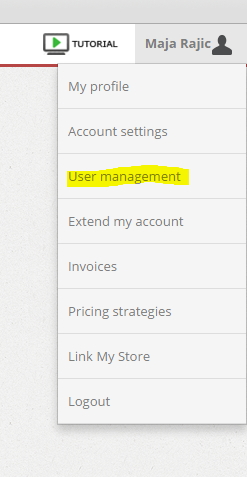
1. Administrator – this is a user that has full access to all Price2Spy operations (add / edit products, create reports, strategies and widgets etc.). Administrators can also add new users or edit the settings for existing users. To do so, an Administrator should click their profile name and choose User management:
um 1

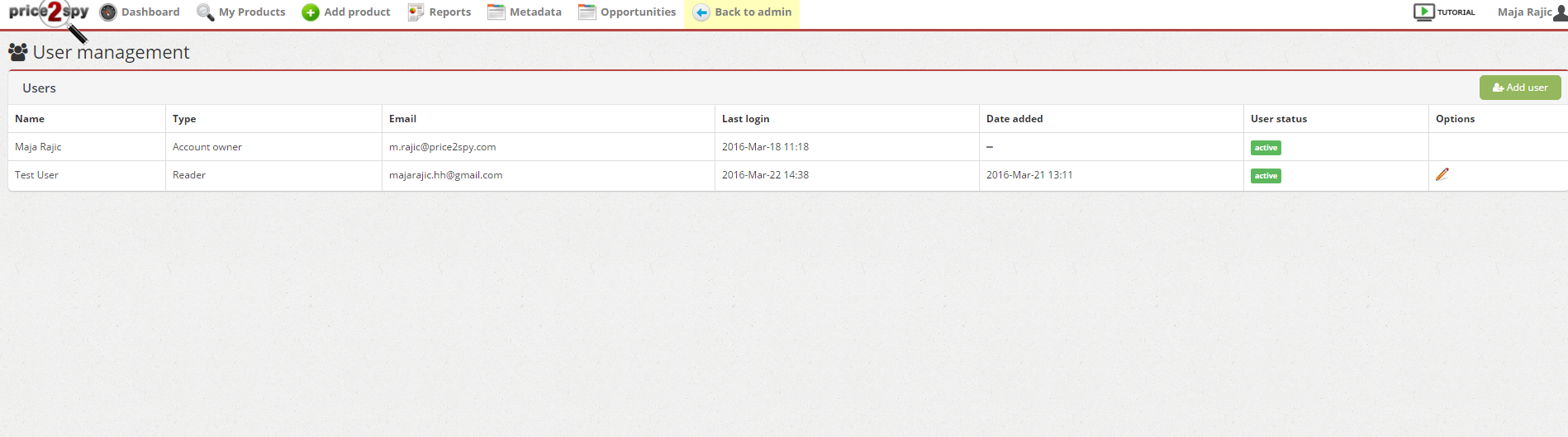
A list of all current users for that Price2Spy account will appear. To add a new user, click on the green Add user button.
um 11

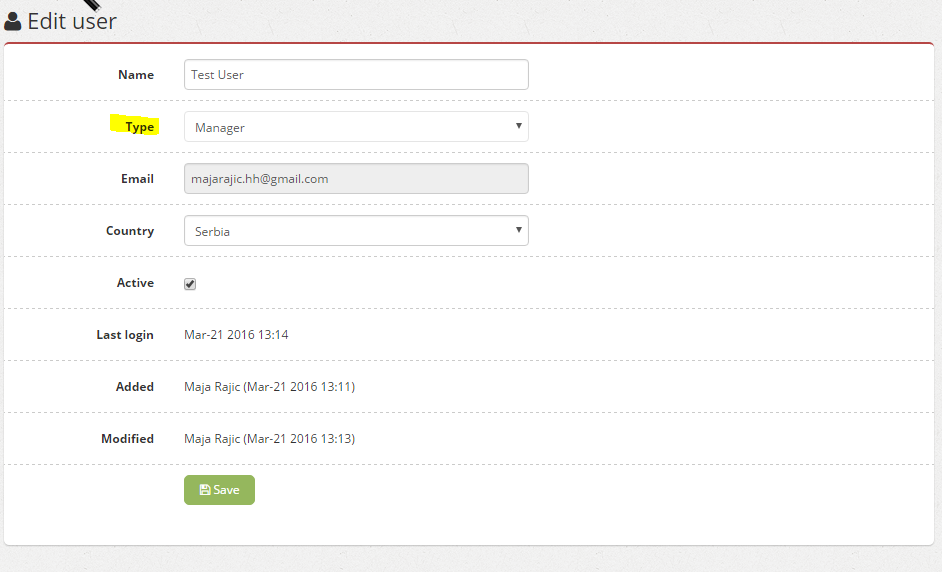
You can now choose different options for this user, and the most important one is type – which defines the rights this new user will have on this account. Choose the desired settings and click Save.
um 3

For example, I created a test user and made it a Manager under my account.

To Edit a certain user settings, click the Edit button and repeat the same process as described above.

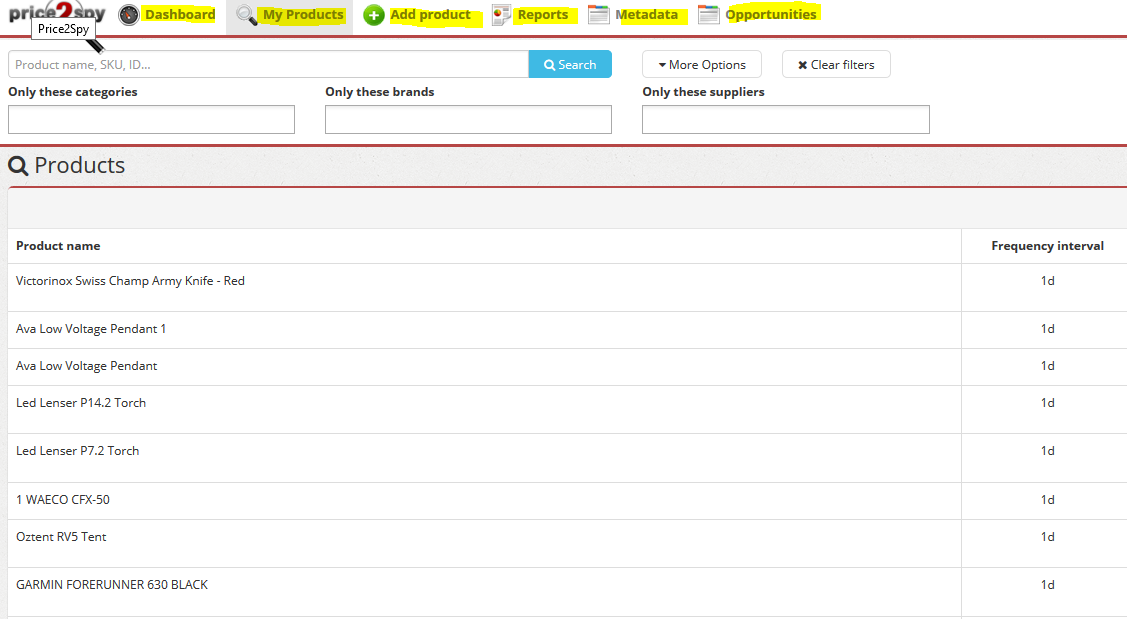
2. This brings us to what a Manager can do – basically they can perform the same operations as Administrators (add / edit products, pull out reports, create strategies and widgets etc.) – please take a look at the screenshot – all the features highlighted in yellow are available for Managers.
um 5


However, the difference between an Administrator and a Manager is in these operations – a Manager doesn’t have rights to do the following:

  • Change account settings
  • Perform changes to user accounts
  • Perform ‘Link my store operations’

3. And finally, the 3rd type of user we offer is Reader – this user can fully browse the data and create reports and widgets. However, if you take a look at the screenshots, you can see that options as ‘delete / edit/ add’ aren’t available to Readers.
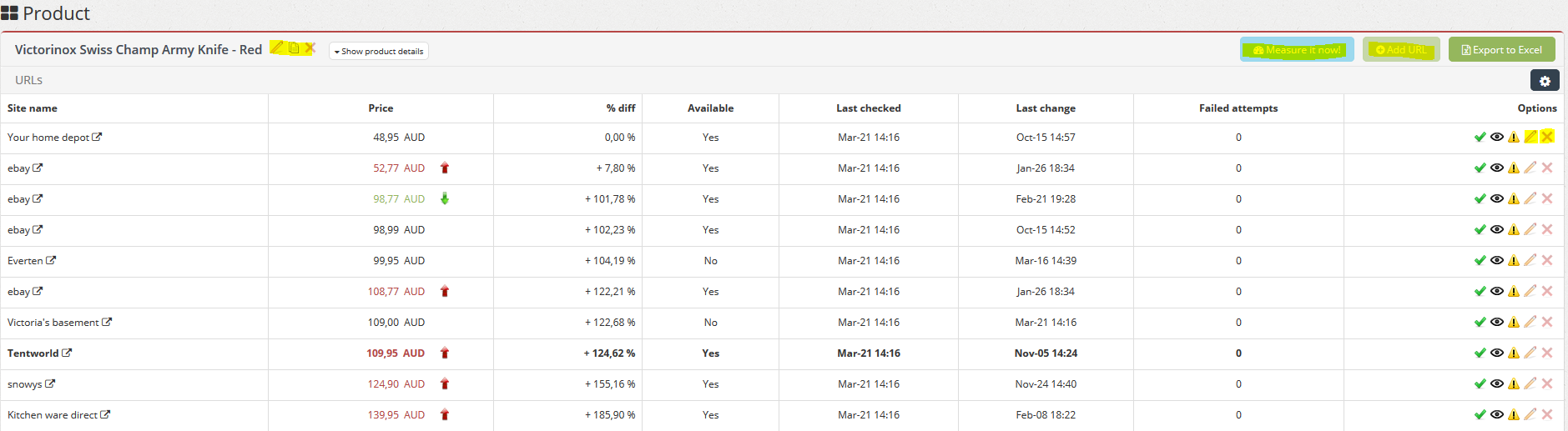
um 6

A reader can also create and export Reports, but not Automate them.
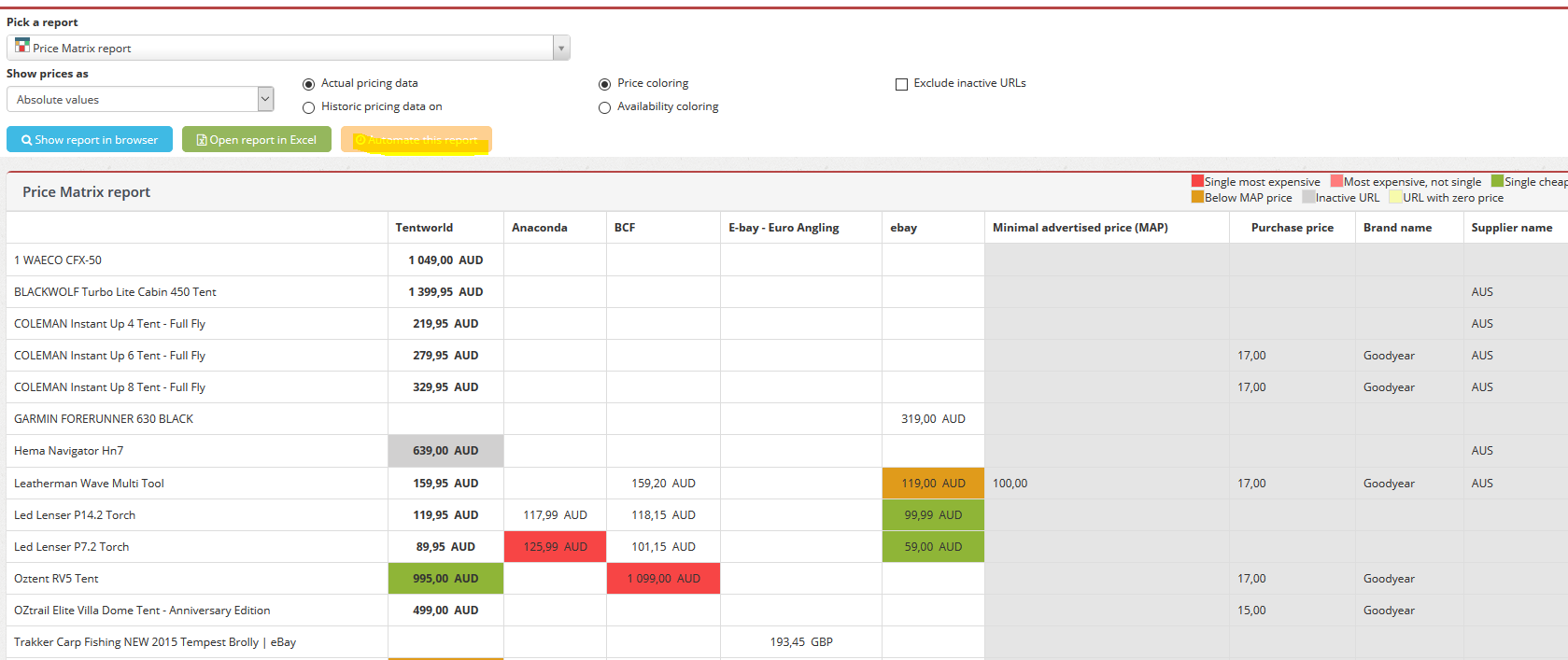
um 7

Each user is now able to choose their passwords and starting page, and customize their Dashboard to their preference. They can do this by clicking on the account name and then clicking on My profile. A new window with user settings will appear:
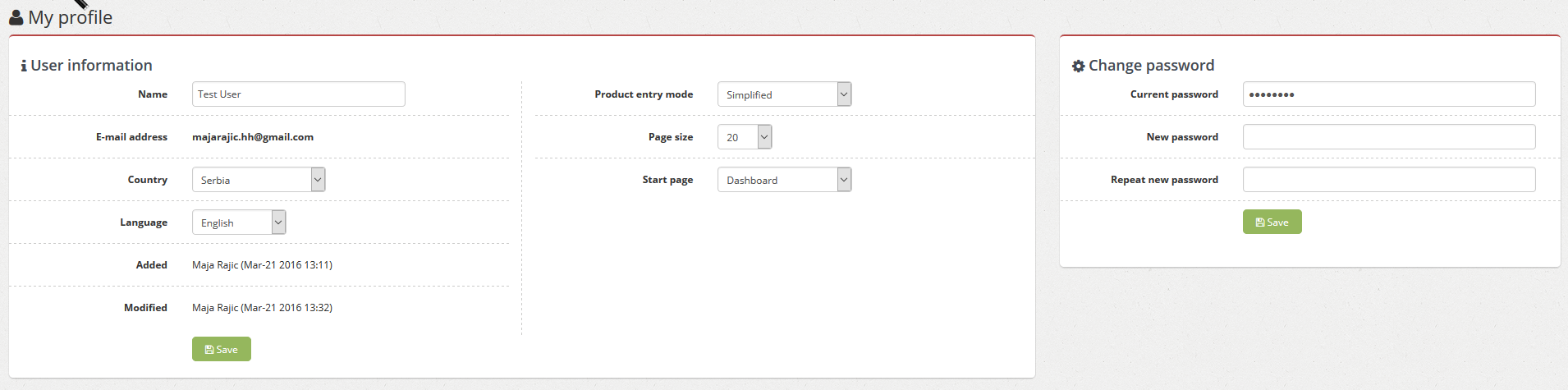
um 4

We feel that the user management will enable our clients to use our tool more efficiently and help them organize the work done on Price2Spy within their team. Also, while giving each user their own virtual ‘space’ within an account, it also provides full data transparency – so you can see:

  • Timestamp when object was first added to Price2Spy
  • User who added the object
  • Timestamp when object was last updated in Price2Spy
  • User who performed this update

User management is available to our Premium users starting from Price2Spy Premium Medium price plan.

We are thrilled that this feature is up and running and want to thank you for your patience and encourage you to give it a try!


 

Featured Posts

Product Pricing for eCommerce: How to Set Prices T…

Pricing is one of the most influential decisions in eCommerce. It determines how competitive your products appear, how customers perceive their value, and how profitable your business becomes. Unlike in physical retail, online markets are highly transparent. Customers can compare prices...

read more
Top repricing software for ecommerce businesses

Top 8 Repricing Tools for Online Retailers and Mar…

A pricing manager logs in on Monday morning and notices several top-selling products have already lost competitiveness overnight. One marketplace competitor lowered prices late Sunday, others followed within hours, and by morning, the market position had shifted. Updating prices manually...

read more

Top 5 Competitive Intelligence Tools to Understand…

Competitive intelligence (CI) is a broad term that encompasses multiple different aspects and activities, such as gathering data about competitors, customers, and market trends. Since it’s so vast, there are countless tools to choose from, each for a different purpose....

read more


Table of contents

    Categories

    Best practices in price monitoring Free downloads Guest post New Price2Spy features Product matching Top tool lists

    Recent Posts

    • Purchase Decision Process: Sell More by Understanding Your Customers
    • The Role of Pricing in Purchase Decisions
    • Pricing Intelligence | Definition, Use Cases, and its Importance in eCommerce
    • What is Price2Spy
      • Why Price2Spy?
      • About Price2Spy / Contact
    • Integrations
      • Pricing API
      • eCommerce platforms
      • Google Analytics 4
    • Solutions
      • Services
        • newMatching service
        • Site crawl
      • Customization
        • Product variations
        • Track custom details
      • Pricing intelligence
        • Price monitoring
        • MAP monitoring
        • Marketplace monitoring
      • Pricing analytics
        • Pricing reports
        • Pricing dashboard
    • More features
      • Modules
        • Advanced repricing
        • Automatch
        • Capture screenshots
        • User management
      • Uses
        • Online retailers
        • Manufacturers/distributors
        • Our clients
        • Repricing scenarios
      • Buttons
        • Monitored websites
    • Pricing
      • Pricing tiers
      • Payment processor
      • ChipCard
    • Resources
      • Blog
      • eCommerce pricing dictionary
      • Knowledge base
      • Tutorials
      • FAQ
      • Careers
    • Full Width
      • TSS Logo
    • LinkedIn
    • Twitter
    • Youtube
    Payment methods:
    • Mastercard
    • Maestro
    • Visa
    • Dina Card
    • Chipcard
    • Bank Wire
    • Mastercard Secure
    • Visa Secure
    Certificates:
    • ISO 27001
    Copyright © 2026 Webcentric / Price2Spy® Terms and Conditions Privacy / refund policy