Price2Spy NewsletterSubscribe

Search
Logo Logo Logo Logo
  • What is Price2Spy
    • Why Price2Spy?
    • About Price2Spy / Contact
  • Solutions
      • Services
        • newMatching service
        • Site crawl
      • Customization
        • Product variations
        • Track custom details
      • Pricing intelligence
        • Price monitoring
        • MAP monitoring
        • Marketplace monitoring
      • Pricing analytics
        • Pricing reports
        • Pricing dashboard
      • Modules
        • Advanced repricing
        • Automatch
        • Capture screenshots
        • User management
      • Uses
        • Online retailers
        • Manufacturers/distributors
        • Our clients
        • Repricing scenarios
      • Monitored websites
  • Integrations
    • Pricing API
    • eCommerce platforms
    • Google Analytics 4
  • Pricing
  • Resources
    • Blog
    • Knowledge base
    • Tutorials
    • FAQ
    • eCommerce pricing dictionary
  • Try for free
  • Login
  • What is Price2Spy

    • Why Price2Spy?
    • About Price2Spy / Contact
  • Solutions

      • Services

        • newMatching service
        • Site crawl
      • Customization

        • Product variations
        • Track custom details
      • Pricing intelligence

        • Price monitoring
        • MAP monitoring
        • Marketplace monitoring
      • Pricing analytics

        • Pricing reports
        • Pricing dashboard
      • Modules

        • Advanced repricing
        • Automatch
        • Capture screenshots
        • User management
      • Uses

        • Online retailers
        • Manufacturers/distributors
        • Our clients
        • Repricing scenarios
      • Monitored websites
  • Integrations

    • Pricing API
    • eCommerce platforms
    • Google Analytics 4
  • Pricing
  • Resources

    • Blog
    • Knowledge base
    • Tutorials
    • FAQ
    • eCommerce pricing dictionary
  • Try for free
  • Login
Home / New Price2Spy features / Price2Spy introduces additional product fields and labels

Price2Spy introduces additional product fields and labels

Written by: Jelena Gabrish New Price2Spy features 31.7.2019. Reading Time: 3 minutes

We are happy to announce that we have recently introduced a big change in Price2Spy. A lot of our clients asked to add more product attributes in the account, which they can use for identifying the products more precisely. We also had a couple of requests to include an option for leaving notes for products in the account. As we always strive to adapt to our client’s needs, these features have been implemented, so you are welcome to start using them.

Please feel free to check these new options by clicking on your profile name >> Account Settings >> Fields and Labels.
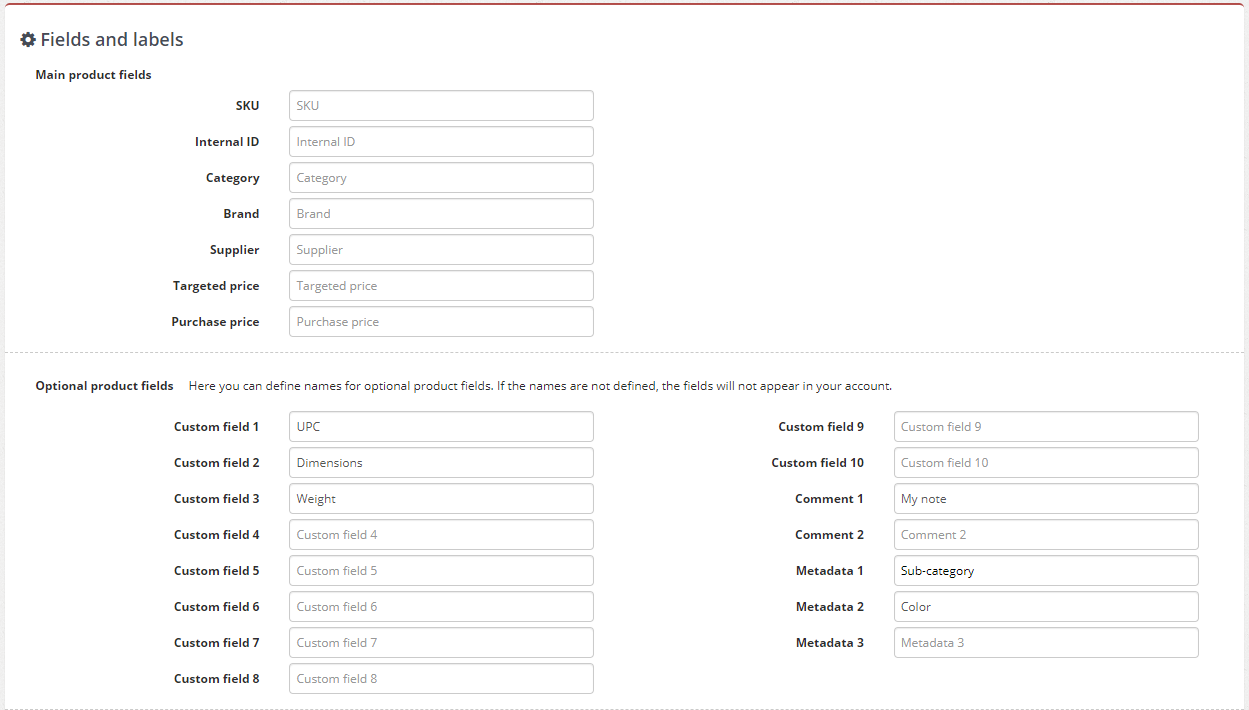
Fields and labels

As you can see, there are different types of new fields you can use. In order to activate them in your account, just type in a custom field name and click on Save button at the bottom of the page.

Comment fields

There are two fields (Comment 1 and Comment 2) which you can use to add some comment about the products you monitor. These can be very useful if you wish to leave a note to yourself or to your team member. For example: “Check this product next month”, “Analyze competitor behavior next month”, “Download the product history chart”, and so on.

Metadata fields

The biggest impact of these changes might be the Metadata fields. So far, our clients had an option to use 3 different metadata fields, where they could enter the product’s Category, Brand and Supplier, and later use those in filtering the reports and widgets, or splitting the alert emails.

As of now, you have another 3 Metadata fields, in which you are welcome to add more product data which can be useful for identifying specific products. The fields are fully customizable, so you can choose which product identifiers or attributes you would like to use as filters.

Also, all metadata now have the Select all option in filters.
In FILTERS, on all pages, for all metadata types that are available, Select all is present at the top of the dropdown, and clicking it selects/deselects all offered options.
This option is possible in all major sections: My products, Reports, Dashboard, and Repricing.

For example, if you monitor mobile phones you can attach 7 different filterable attributes to them, such as Category, Sub-category, Brand, Condition, Color, Network and Supplier. You would then be able to filter the reports so that you would see the results only for the products with common metadata, for example the ones which are “Used – good condition”.

For other types of products, you might choose to add metadata such as division, product class, universe, region, gender, season, etc.

Custom product fields

The new options include 10 additional product fields. This means that besides adding the product SKU and Internal ID, you can use these fields for other product data which can help you identify the products. These can be other types of codes used for products (EAN, UPC, GTIN, ASIN, MPN, Serial number etc.), or various product attributes or properties such as product size, dimensions, weight, radius, pack size, etc.

How to add additional product data into the account?

There are different ways the additional product data can be added into the account

  • Manually – When you add the product or edit its details, as in the screenshot:
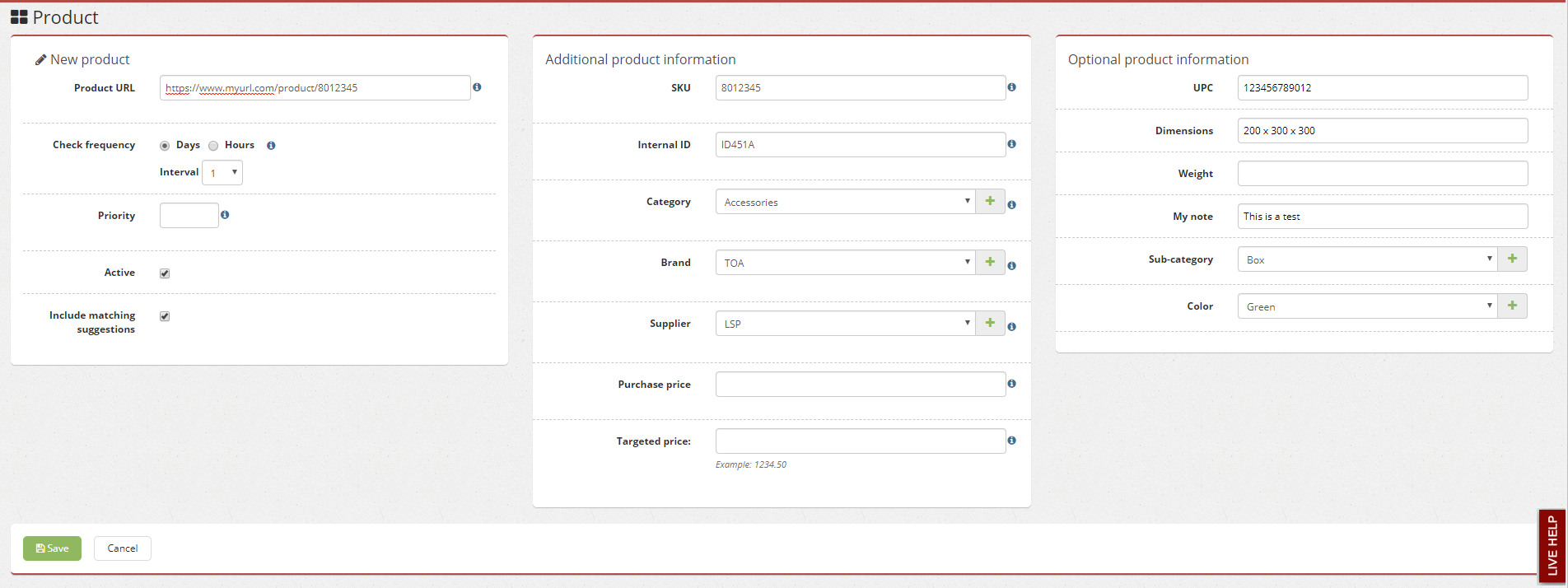
Adding product with new fields

  • Import – Feel free to send an Excel file with your product data, and we will import everything in bulk through our database free of charge
  • API – You will also be able to populate these fields via API

We hope these changes will improve your experience with Price2Spy, and help you track your products and monitor the market in a better way. If you have any comments or questions, please drop us a line at info@price2spy.com.

Featured Posts

Competitor stockout affecting retail pricing decisions and price adjustments

What Should Retailers Do When a Competitor Is Out …

Your closest competitor sells a product for $95. You sell the same product for $99. Then their product goes out of stock. Should their $95 price still influence yours? Should you keep your price at $99, or does the stockout give you...

read more

What Is Product Matching in eCommerce?

Identical products are matched by comparing identifiers, model information, product attributes, pack sizes, variants, and other listing data. When exact identifiers are unavailable, matching systems evaluate combinations of signals to determine whether two listings represent the same product. Similar products require...

read more
competitor product data points

What Data Should You Collect From Competitor Produ…

Most pricing and category teams already collect competitor product data. The bigger question isn't whether to collect more data, but which data actually helps explain what's happening in the market. A lower price doesn't automatically require a response. It could be...

read more


Table of contents

    Categories

    Best practices in price monitoring Free downloads Guest post New Price2Spy features Product matching Top tool lists

    Recent Posts

    • How Should Retailers Compare Prices When Shipping Costs Differ?
    • How Should Brands Respond to MAP Violations?
    • What Should Retailers Do When a Competitor Is Out of Stock?
    • What is Price2Spy
      • Why Price2Spy?
      • About Price2Spy / Contact
    • Integrations
      • Pricing API
      • eCommerce platforms
      • Google Analytics 4
    • Solutions
      • Services
        • newMatching service
        • Site crawl
      • Customization
        • Product variations
        • Track custom details
      • Pricing intelligence
        • Price monitoring
        • MAP monitoring
        • Marketplace monitoring
      • Pricing analytics
        • Pricing reports
        • Pricing dashboard
    • More features
      • Modules
        • Advanced repricing
        • Automatch
        • Capture screenshots
        • User management
      • Uses
        • Online retailers
        • Manufacturers/distributors
        • Our clients
        • Repricing scenarios
      • Buttons
        • Monitored websites
    • Pricing
      • Pricing tiers
      • Payment processor
      • ChipCard
    • Resources
      • Blog
      • eCommerce pricing dictionary
      • Knowledge base
      • Tutorials
      • FAQ
      • Careers
    • Full Width
      • TSS Logo
    • LinkedIn
    • Twitter
    • Youtube
    Payment methods:
    • Mastercard
    • Maestro
    • Visa
    • Dina Card
    • Chipcard
    • Bank Wire
    • Mastercard Secure
    • Visa Secure
    • American Express Secure
    Certificates:
    • ISO 27001
    Copyright © 2026 Webcentric / Price2Spy® Terms and Conditions Privacy / refund policy